Start with our art, or make your own with Nano Banana or any image AI. Arcwright turns it into animated sprites.
1 · Start with our art: no importing
Open Packs in the bottom panel. Six free Starter Library packs come with this editor: a jungle and castle platformer, a Wellspring adventure, the deep sea, lit Paper Forge art, effects and game UI. Click any piece to put it in your scene, or drag it where you want it. Heroes and enemies arrive already animated, tile sets arrive as a map you paint with the Tile palette, and backgrounds scroll with parallax. Everything in the packs is free to use in your games.
2 · Make sprites with Nano Banana (or any image AI)
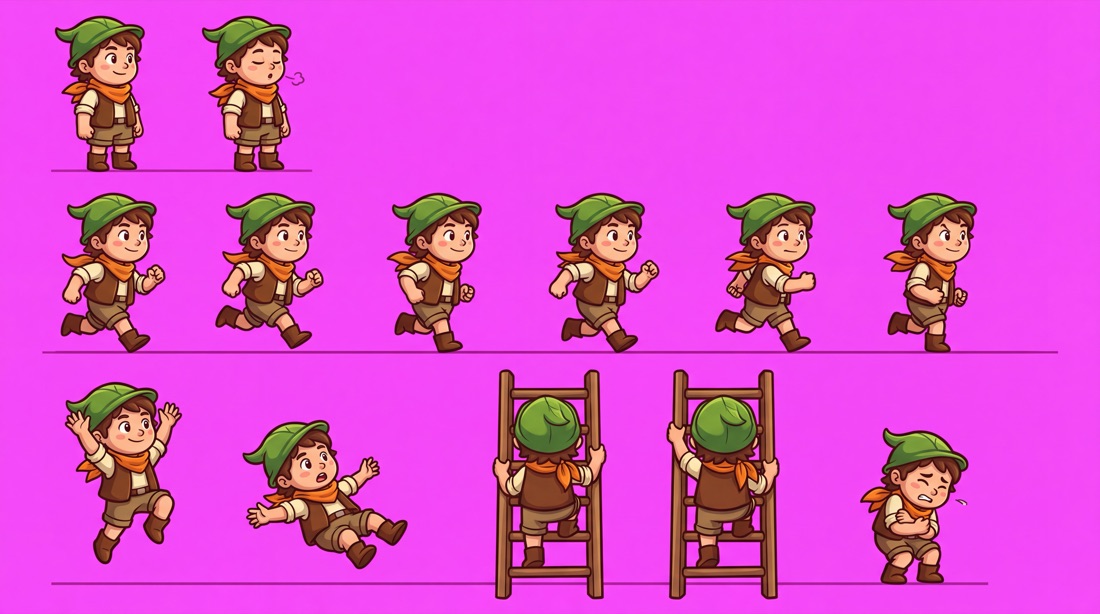
The trick is one sheet per character: every pose side by side on a flat magenta background. Magenta (#FF00FF) almost never appears in game art, so Arcwright can remove it cleanly, find each pose, and line them up as animation frames that stand on the same feet line.
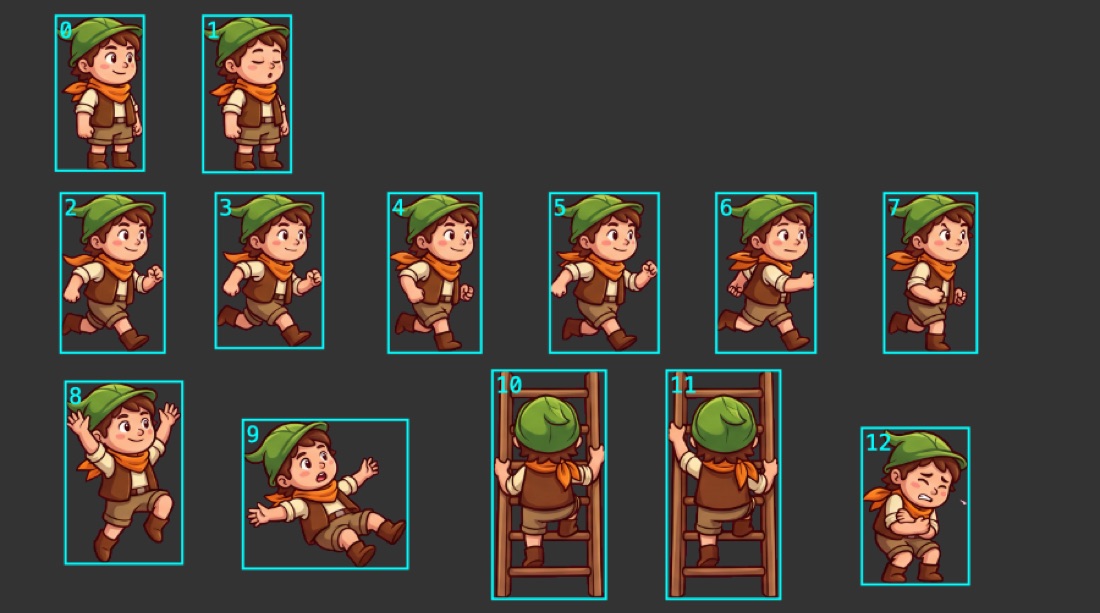
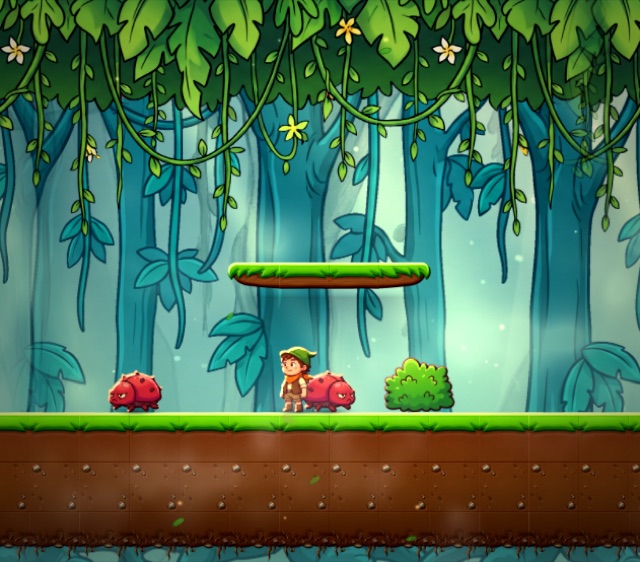
What Nano Banana made: 13 poses on magenta.Arcwright removes the magenta and finds each pose, in reading order.In a game: the same hero with the beetles from the enemy sheet.
The rules that make a sheet cut cleanly
Flat magenta background (#FF00FF), the same colour everywhere: no gradient, no floor, no shadow on it.
Poses don't touch. Leave a gap between them; a sword or a puff of air can stick out, but not into the next pose.
Side view, facing right, for platformers. Arcwright flips the sprite for running left.
Same size, same feet line in every pose, so your character doesn't grow or float between frames.
In order: idle, then the run cycle, then jump, fall, climb, hurt. Reading order (left to right, row by row) becomes frame 0, 1, 2…
Clean dark outline, light from the top left, no text, labels or frame numbers.
Keep magenta out of the character itself. Purples are fine: Arcwright keeps colours darker or greyer than the background.
Same character next time: attach your first sheet to the next request and say "keep exactly this character".
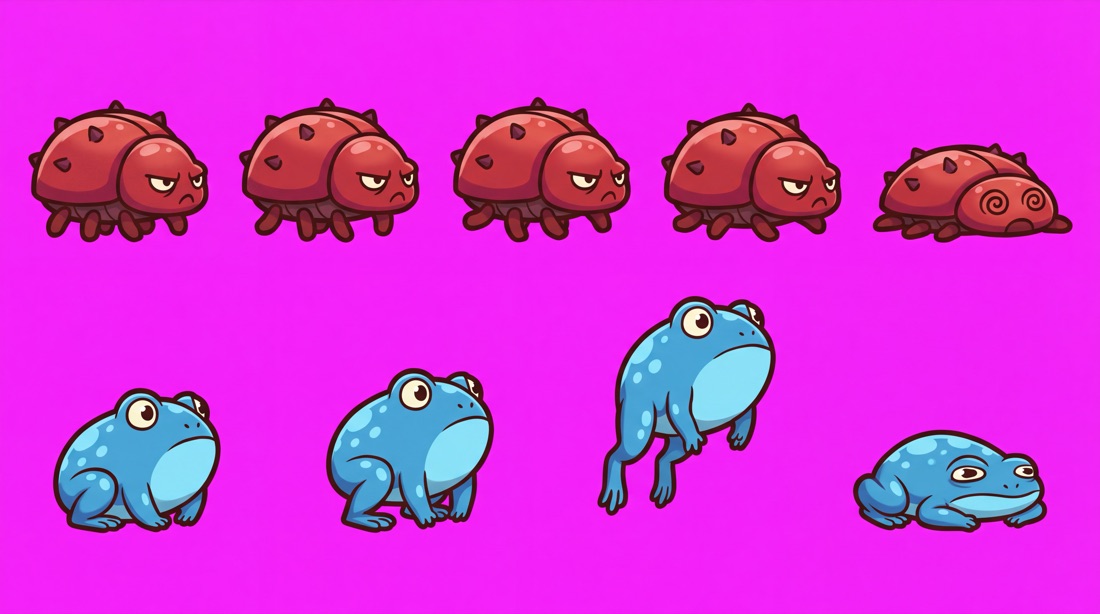
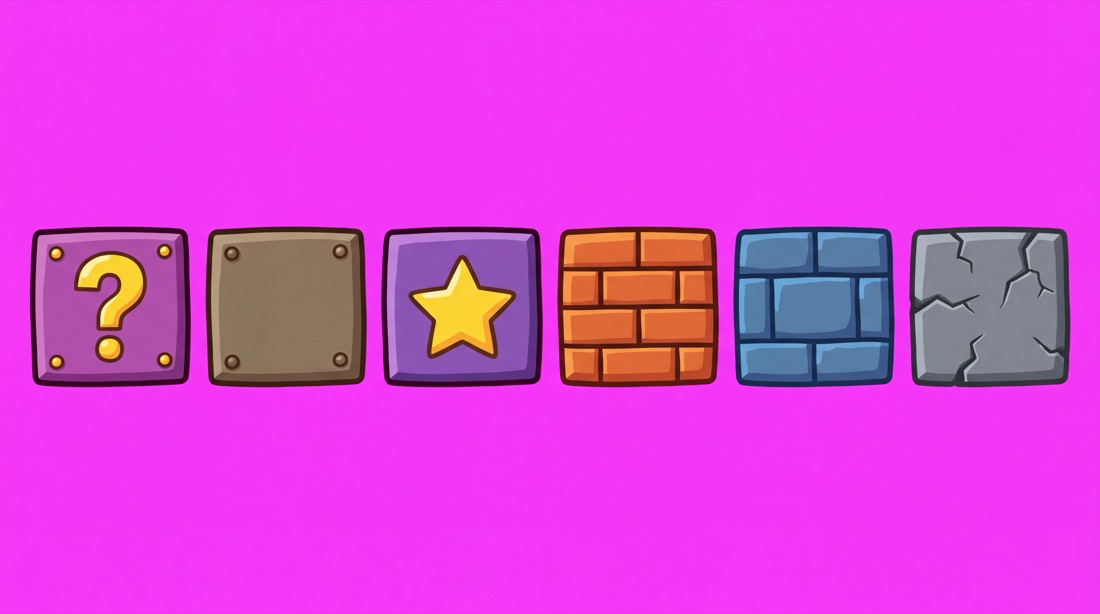
Two enemies on one sheet: cut them, then name clips per enemy (beetle 0–4, frog 5–8).Blocks and props work the same way. The purple blocks stay purple.
3 · Prompts to copy
Paste one into Nano Banana (Google Flow or Gemini) or your image AI, then change the words in capitals.
Hero sheet
Original 2D game character sprite sheet: A YOUNG EXPLORER IN A GREEN HAT AND ORANGE SCARF. Side view facing right, full body, the same character and size in every pose: 2 idle poses, 6 running frames, 1 jump, 1 fall, 2 climbing a ladder seen from behind, 1 hurt. Poses in rows with clear space between them, all standing on the same baseline. Cartoon game art with a clean dark outline, flat colours with soft shading, light from the top left. Solid flat magenta #FF00FF background, no shadows, no ground, no text.
Enemies
2D game enemy sprite sheet, original designs: A RED ARMOURED BEETLE (4 walking frames and 1 squashed) and A BLUE FROG (sit, crouch, jump, squashed). Side view facing left, same scale for each enemy in every frame, clear space between poses, same baseline. Cartoon game art, clean dark outline, light from the top left. Solid flat magenta #FF00FF background, no shadows, no text.
Props and pickups
2D game props sheet, original designs: A GOLD COIN, A GEM, A WOODEN SIGN, A TREASURE CHEST (closed and open), A TORCH. Each item separate with clear space around it, front view, cartoon game art with a clean dark outline, light from the top left. Solid flat magenta #FF00FF background, no shadows, no text.
Ground blocks
2D platformer tile set: square blocks for A JUNGLE level, all the same size: grass-topped ground, plain dirt, brick, stone, a question-mark prize block, a cracked stone block. One row with space between them, front view, cartoon game art with a clean dark outline. Solid flat magenta #FF00FF background, no text.
Background layers
Wide 2D game background for a side-scrolling level, A MISTY JUNGLE AT SUNSET, painted in the same cartoon style, 16:9, no characters, no text. Then: the same scene's near layer only (big leaves and vines in front) on a solid flat magenta #FF00FF background.
Effects
2D game effect sprite sheet: AN EXPLOSION in 6 frames from spark to smoke, then A SWORD SLASH in 4 frames. Frames in a row with clear space between them, bright cartoon game art. Solid flat magenta #FF00FF background, no text.
4 · Bring them in
Two ways, both with the background removed and the poses cut into frames:
Drop the sheet into the chat (or press 📎 or paste it) and say what it is: "this is my hero". The AI turns it into a sprite and sets up its animations.
Or Import pictures in Project Files (or drop the file on the scene). You see the cut before it's added: every pose found gets a number. Choose the background if it isn't found for you.
5 · Animate
Select the sprite and open Animation. You see every frame. Make a clip for each move from its frame numbers, for example idle 0–1 at 3 fps, run 2–7 at 12 fps, jump 8, fall 9, climb 10–11, hurt 12. Then press Play: the game picks the clip from what the character is doing.
6 · Build with the AI
Talk to it like a game designer: type, or press 🎤 and say it. Things to try: "Make me a platformer level with these sprites", "Add three enemies that walk back and forth", "Make it night with torches", "Play-test it and fix what's too hard". Every change it makes can be undone.
These are the real projects: scenes, art, scripts, lights and physics, running on the same engine as the desktop app. Change anything, press Play, and download the project to keep building in Arcwright.
Scene · Main
Drop a PNG to add a sprite · W move · E rotate · R scale · B tiles
YOUR FIRST LITTLE WORLD
1 · Play it2 · Change something3 · Make it yours
A jungle. A hero. Your move.
Press Play, then use arrows and Space to explore. No account
needed.
Loading Arcwright runtime…
— fps
Choose a tile, then paint in the viewport. One stroke = one undo.
Saved scripts run on Play.
Validated by the desktop SceneText parser.
Select a sprite to see its frames and animation clips.
New clip frames
to at
fps
Click a change to go back to before it. Undo ⌘Z · Redo ⇧⌘Z
A test bot plays 10 seconds in a separate engine; your scene is not changed.