The editor, a picture tour
A tour of the Arcwright editor in pictures: what every part of the screen is, in Make mode and in Pro mode, and where to find each tool. If you've never used a game engine, start here.
The short version. The Make | Pro switch in the top bar sets how much you see. Make is the simple view: your game, the chat, and a path of next steps. Pro is the full editor: the scene list on the left, the world in the middle, the Inspector on the right and the panels along the bottom. Flip it any time; your game doesn't change.
Make mode
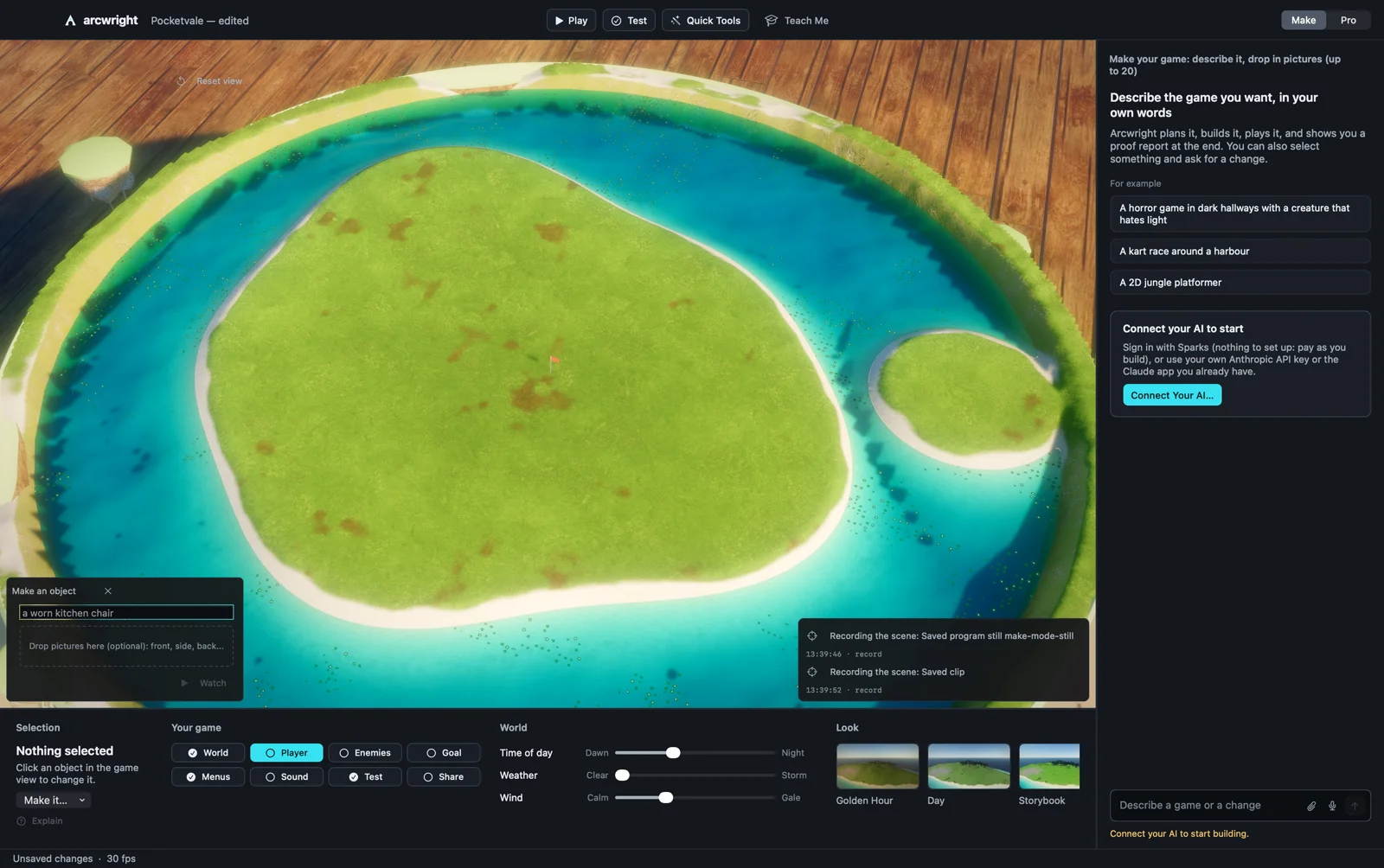
| Where | What it's for |
|---|---|
| Top bar | Play and Test your game, Quick Tools, and Teach Me. The Make | Pro switch is on the right. |
| The world (middle) | Your game as it looks. Click an object to select it. |
| Chat (right) | Tell your AI what you want, in your own words, and drop in up to 20 pictures. It plans it, builds it step by step while you watch, plays it, and shows you a proof report at the end. Select something and ask for a change. Before the first build, Connect your AI: sign in with Sparks, use your own Anthropic API key, or connect the Claude app you already have. |
| Selection (bottom left) | The selected object. Make it… gives it a role in one click: an enemy, a door, a pickup, the goal. Explain says what it is and does. |
| Your game | Eight steps: World, Player, Enemies, Goal, Menus, Sound, Test, Share. Each is checked against your real project; a tick means it's done, and the next one to do is the bright one. Click a step for what it is, Show me how (a Teach Me lesson) and Ask the AI. |
| World | Time of day (dawn to night), weather (clear to storm) and wind (calm to gale), as sliders. |
| Look | The mood cards: golden hour, day, storybook, night, noir, war-torn. One click sets the sun, sky, haze and colour together. |
| Make an object (over the world, bottom left) | Type a thing ("a worn kitchen chair") and the Forge builds it in front of you. Press Watch to follow it. |
Pro mode
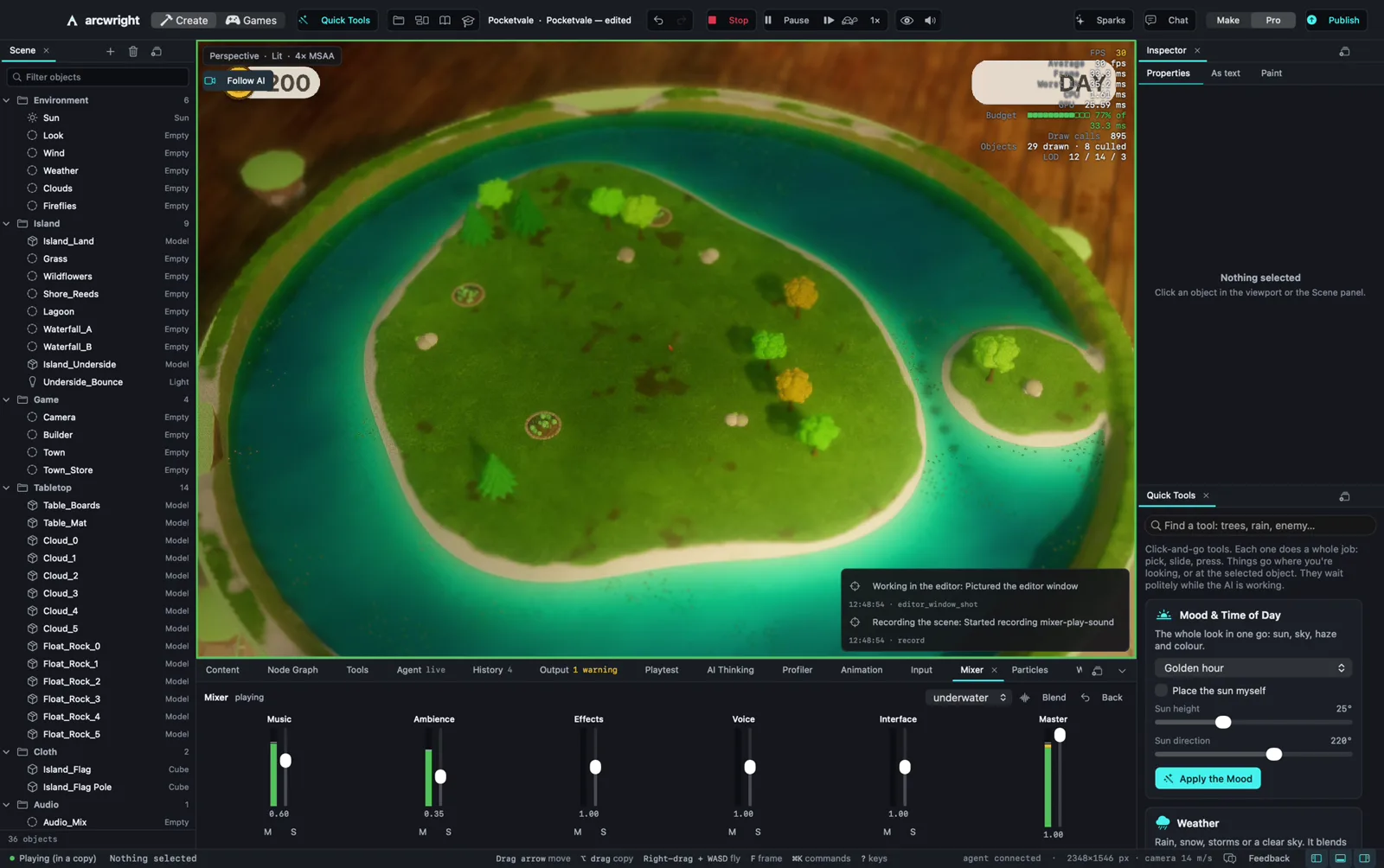
| Where | What it's for |
|---|---|
| Top bar | Create (make your game) and Games (play and publish), Quick Tools, the project name, undo and redo, Play/Stop, Pause and Step, play speed (the tortoise: real time, ½, ¼ or ⅒), the debug-view eye (colliders, triggers, joints, cloth), sound, Sparks, Chat with the AI, the Make | Pro switch, and Publish. |
| Scene (left) | Every object in the open scene, in folders. Click to select, drag onto a folder to group. Each folder has an eye (hide while editing) and a lock (can't be clicked in the view). |
| Viewport (middle) | The 3D world. The bar at its top has the tools (select, move, rotate, scale) and snapping. Follow AI keeps the camera on what the AI is doing. |
| Inspector (right) | Everything about the selected object: position, its model, lights, physics, scripts, Motion AI. As text shows the same object as plain text you can edit. Several objects selected: edit them together. |
| Quick Tools (under the Inspector) | Click-and-go tools that each do a whole job: Mood & Time of Day, Weather, land, trees, water and more. Search them by word. |
| Panels (bottom) | Content, Node Graph, Tools, Agent, History, Output, Playtest, AI Thinking, Profiler, Animation, Input, Mixer, Particles, Workshop, Timeline and Game UI (below). Open any from Window › Panels; drag a tab out to give it its own window. |
The panels
| Content | Models, materials and sounds in your project. Drag one into the world. |
| Agent | What the AI is doing right now, step by step. |
| History | Every change, by you or the AI. Click one to go back to it (⌘Y). |
| Output | The engine's log: warnings and errors. |
| Playtest | Tests for your scene ("the player can reach the exit in 15 seconds") and their results. |
| AI Thinking | In Play, select a character to see what its brain sees, remembers and decides. |
| Workshop | Scripts, model recipes and shaders as they change, readable and editable. |
| Game UI | Your game's menus, HUD and dialogue boxes: pick a look, preview it, change fonts and colours. |
| Animation | The selected character's state machine as a graph, live in Play. |
| Mixer | Each sound bus's level and live meter, mute and solo, and mix snapshots. |
| Profiler | Where each frame's time goes, live. Frame Doctor explains what to change. |
| Input | Your game's named controls: keys, mouse and controller buttons. |
| Particles | The selected emitter's curves over its life: size, fade and end tint. |
Watching the AI work
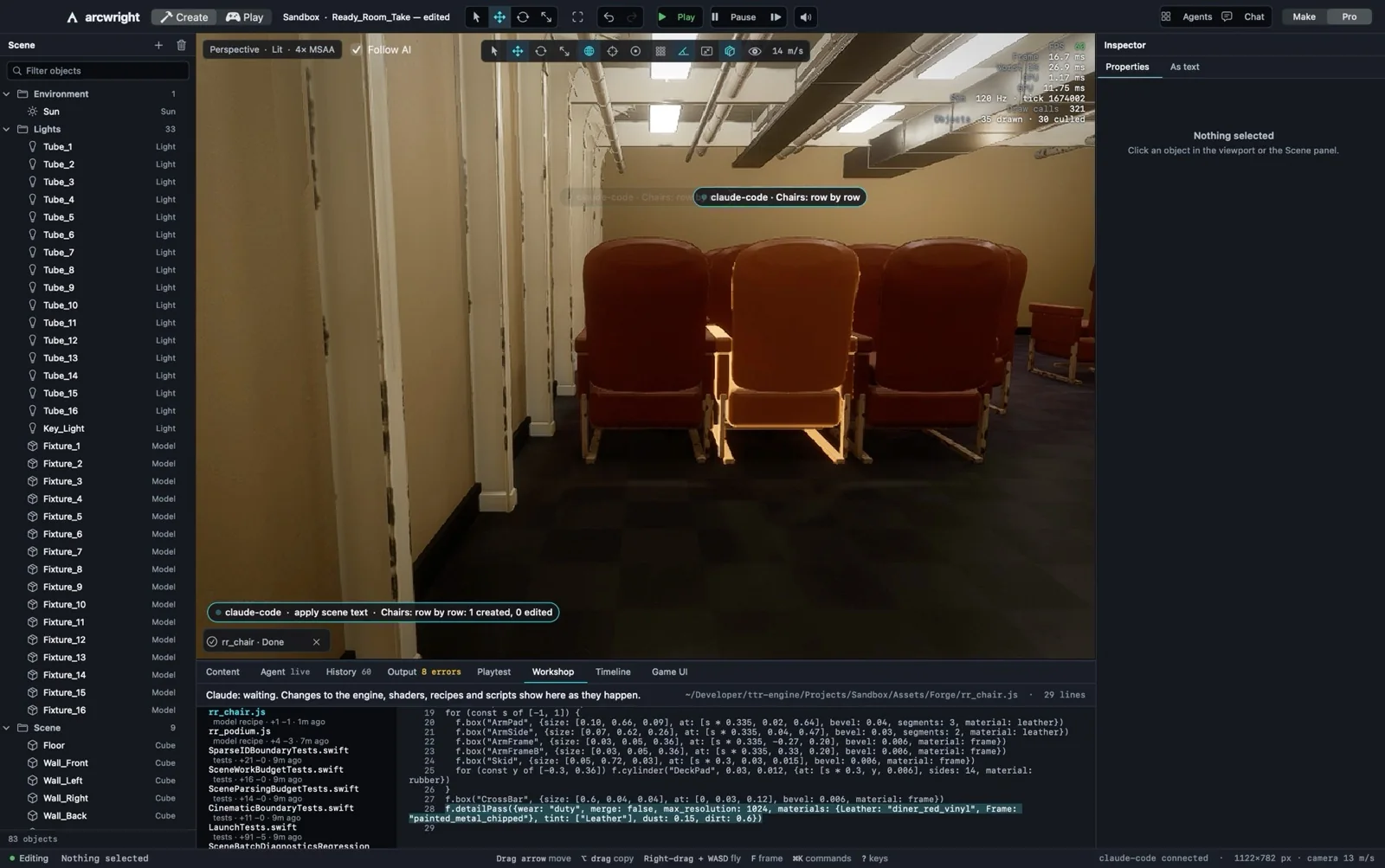
Everything the AI does happens on screen. Follow AI keeps the camera on the work; drag the view and you're in control. Every change lands in History, where you can undo it. You can stop the AI, change what it made, or undo it at any time.
The Camera panel
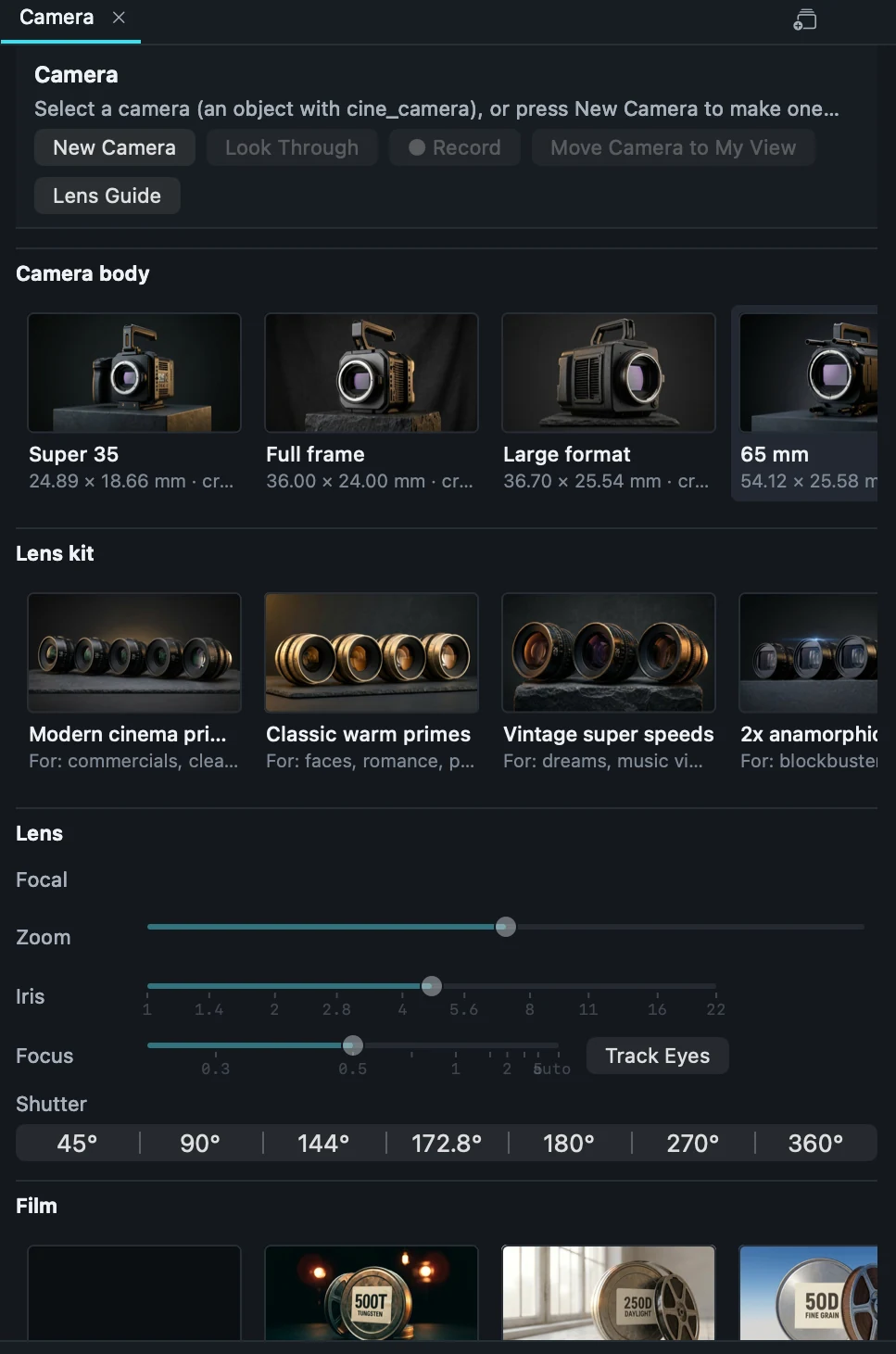
See Camera bodies, lenses and focus.
Moving around and shortcuts
- Fly: hold the right mouse button and use W A S D. F frames the selected object.
- ⌘K opens the command palette: type what you want ("duplicate", "drop to surface").
- ⇧H isolates the selection and hides the rest.
- Vertex snap: ⌥V, or hold V while moving, puts corner on corner.
- Teach Me (Help › Teach Me…, or the graduation-cap button) runs short lessons on the real editor, lighting up the button you need one step at a time.
Next: Moving around, Play and test, The Forge, step by step.
Arcwright Beta 2 (0.4.0) · generated from the engine source (25e375c86)Something wrong or missing? Tell us